 |
|
More Related Stories |
 |

From: $289 to $309  |
|
Adobe Photoshop Creative Suite 2.0 For Windows
Adobe Photoshop Creative Suite 2.0 V9.0
From: $367 to $708 |
|
Adobe Photoshop CS2 for Windows - Upgrade
Enjoy desktop digital imaging with Adobe Photoshop...
From: $145 to $212 |
| Page (1) of 1 - 12/20/05 |
 email article email article |
 print
page print
page |
The brushes
This new library of brushes for Adobe Photoshop--Nagel Series 35--offers custom brushes designed for creating clouds and similar effects, such as mist and haze, fog, smoke and the like. What distinguishes this latest collection from previous collections of cloud brushes that we've offered is shear size. The brushes in Nagel Series 35 range from a 333-pixel diameter at the small end all the way up to 877 pixels on the top end. So these are geared primarily toward working on larger images and images with high resolutions to provide a large amount of cloud cover quickly. However, you can also adjust the size of the brushes downward for working on smaller images.
There are 15 brushes in total, all of which are designed to be used for the creation of clouds. All of the brushes are fully dynamic and take advantage of features found in Wacom Intuos, Cintiq and Graphire tablets, including pressure and tilt, to modify characteristics like size, opacity and scatter. (Graphire and some Cintiq models don't support pen tilt.) They're also fully customizable, so you can adjust controls and brush characteristics to suit your needs.
Here are samples of all of the brushes in this week's colection. The examples are all drawn with just one or two strokes of the brush using varying pressure and tilt on the graphics tablet to achieve variation. Some of the samples were also created using variations on blending modes to achieve brighter, sunset-like colors. (I'll be posting a tutorial later this week on how to accomplish these sorts of effects using the brushes in this collection, so stay tunes for that.) In some cases, the diameters of the brushes were altered in order to allow the details to show in these small previews. Below these samples you'll find instructions for downloading and installing this collection.

Nagel Series 35 Clouds 1

Nagel Series 35 Clouds 2

Nagel Series 35 Clouds 3

Nagel Series 35 Clouds 4

Nagel Series 35 Clouds 5

Nagel Series 35 Clouds 6

Nagel Series 35 Clouds 7

Nagel Series 35 Clouds 8
Nagel Series 35 Clouds 9

Nagel Series 35 Clouds 10

Nagel Series 35 Clouds 11

Nagel Series 35 Clouds 12

Nagel Series 35 Clouds 13

Nagel Series 35 Clouds 14
Nagel Series 35 Clouds 15
Remember that you can find even more free downloads by clicking here.
Download and installation
This week's brush collection is compressed in a Zip archive, which can be decompressed using any Zip utility. (Simply double-click the file in Mac OS X to decompress it.) These brushes support Photoshop CS and Photoshop CS2 in Macintosh and Windows environments. They are also supported by recent versions of Adobe Photoshop Elements. These brushes will not function in Photoshop 7.
As always, this latest collection (Nagel Series 35) is free to download and use for commercial and non-commercial purposes.
- Download: Nagel Series 35 Brushes (1.3 MB)
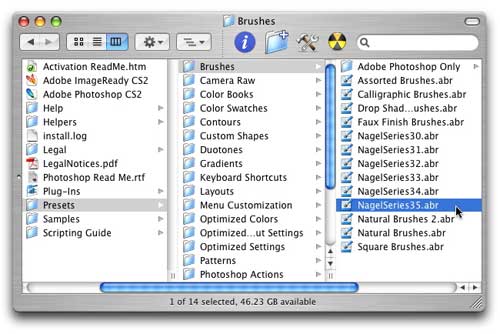
Once you download the brush file (NagelSeries35.zip), expand it. (The expanded file will be called NagelSeries35.abr.). Then move the .abr file into the Brushes directory in your Photoshop folder (/Adobe Photoshop/Presets/Brushes) to make it accessible from the Brushes palette's flyaway menu once you launch Photoshop.
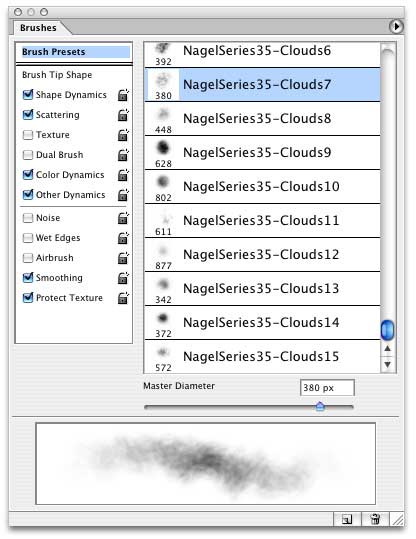
Then launch Photoshop. Open your Brushes palette, and click on the flyaway menu at the top right. There you'll find the new brush collection, listed in alphabetical order with the other brushes in your Brushes directory. You can install this collection simply by selecting it. After you select it, the new brushes will appear at the bottom of the list of available brushes. (Note that if the brushes do not appear in this flyaway menu, you can load them manually by selecting "Load Brushes" from the menu. A dialog will appear asking you to locate the brush file manually.)
If you have any questions, be sure to visit me in our Adobe Photoshop forum here. And remember that you can find our previous downloads by clicking here.
 If you liked this article
click here to recommend it.
Page: 1
If you liked this article
click here to recommend it.
Page: 1
Related Sites: Creative Mac , Digital Producer , Audio Video Producer , Corporate Media News , Digital Media Designer , Oceania , MacDesignPro , PhotoShop
Related Newsletter: DMN Newsletter , Pixels Newsletter , Mac Alert Newsletter , Digital Media Net , DMNForums
To Comment on This Article, Click HERE
Most Recent Reader Comments:
Click Here To Read All Posts
Must be Registered to Respond (Free Registration!!!, CLICK HERE)
Digital favorites
- Casino Online Non Aams
- Betting Sites UK
- Casino UK Sites
- Casino Online Non Aams
- Casino Non Aams
- Casinos Not On Gamstop
- UK Online Casinos Not On Gamstop
- Meilleur Casino En Ligne
- Crypto Casinos
- Casino Online Italia
- Migliori Giochi Casino Online
- Meilleur Casino En Ligne Français
- Casino En Ligne
- Meilleur Casino En Ligne Francais
- Siti Scommesse Non Aams
- Siti Poker Online Migliori
- Meilleur Site De Poker
- Site De Paris Sportif Nouveau
- Sweet Bonanza Fruits Avis
- Parier Sur Ufc
- Fm카지노 가입코드
- 비트코인 스포츠베팅
- Casino Jeux En Ligne
- Sites De Paris Sportifs
- Casino En Ligne Argent Réel
- Cresus Casino Avis
- Migliore Casino Non Aams
- Meilleur Casino En Ligne
- Meilleur Casino En Ligne 2026
- Casino En Ligne Fiable
- Casino En Ligne
- Migliori Casino Crypto
- Bonus Free Spin Senza Deposito
- Casino Online Non Aams Sicuri
- Migliori Siti Scommesse Non Aams
- Meilleur Casino En Ligne De France
- Casino En Ligne
- Casino En Ligne Fiable
- Trusted Online Casino Malaysia
- Nouveau Casino En Ligne 2026
- オンラインポーカー
- Casino En Ligne Cashlib
Source:Digital Media Online.
All Rights Reserved


 (Rated by 2 users)


