 |
|
More Related Stories |
 |

From: $339 to $630  |
|
Adobe Academic Flash Professio... 8.0 for Mac or Windows
Academic (ACD) Flash Professional 8.0 for Mac or W...
From: $231 to $250 |
|
Adobe Systems Incorpora... 38000296 Adobe Flash v.8.0 Professio... - Complete Product
Adobe Systems Incorporated. 38000296 Adobe Flash v...
From: $339 to $876 |
| Page (1) of 3 - 05/30/06 |
 email article email article |
 print
page print
page |
Summary: Zinc is a hugely comprehensive "wrapper" program for Flash that boasts numerous options for the creation of Flash 8-based projectors in addition to an enormous scripting library that makes Flash-based application development on a variety of platforms not only possible, but easy.
Manufacturer: MDM (http://www.multidmedia.com/)
Platforms: Windows, Mac OS X PPC (Universal version expected Summer 2006); projector creation plugins available for PocketPC and Mac OS X from Windows version (Linux plug-in "coming soon")
Price as Reviewed: $299.99 for Windows version; $209.99 for Mac OS X plug-in
Users: Flash Designers and Developers
Recommendation: Strong Buy
Adobe Flash is great for browser-based stuff, but let's face facts: it's pretty lousy for offline use. Sure, you can save Flash movies as standalone projectors, but the glaring lack of customization or ability to interface with the host OS has created a mammoth opening for third parties to drive through. Enter Zinc, from UK-based MDM, which (to put it simply but crudely) puts Flash movies on an enormous steroid regimen. How well does it make Flash into a full-blown application development environment? Let's find out.
What is Zinc?
Since it may not have been abundantly clear from the intro, let's define what Zinc is and what it does. Zinc is (for lack of a better term) a "Flash wrapper" program, in that it is designed to incorporate SWF files as the basis for offline or desktop applications. There are two sides to Zinc: the first is the actual standalone Zinc application, where you set various useful options for packaging SWF files into projectors (screensavers too, if you're a Windows user). The second side of Zinc is the code you write inside of Flash itself ({mdm}Script) that allows Zinc to turn your base Flash movies into truly powerful, full-blown applications. With the latest version of Zinc (2.5), MDM has added support for Flash 8-based SWF files as well as synchronous script execution, both of which are a boon for both designers and developers. As usual, the devil is in the details, so let's examine both sides of the Zinc coin.
The Zinc environment
Zinc comes in various formsthere's a Windows version, a Mac OS X version, a Mac OS X plug-in for the Windows version, a PocketPC plug-in, and even a command-line implementation. MDM is also promising a Linux plug-in as well as Universal support for Intel-based Macs, so Zinc supports (or will support, as the case may be) a broad base of platforms. With so many flavors to choose from, I should clarify what it is I'm reviewing today by noting that MDM provided me with the Windows version of Zinc 2.5 as well as the Mac OS X plug-in, the combination of which allows for cross-platform publishing from a single Windows-based program. With that in mind, let's take the tour.
When launched, Zinc presents a target application screen that contains a list of basic templates for various platforms (fig. 1). You can either choose to start from one of the templates, or start fresh with a blank project. Once you've made your choice, you're taken into the Zinc environment (fig. 2).
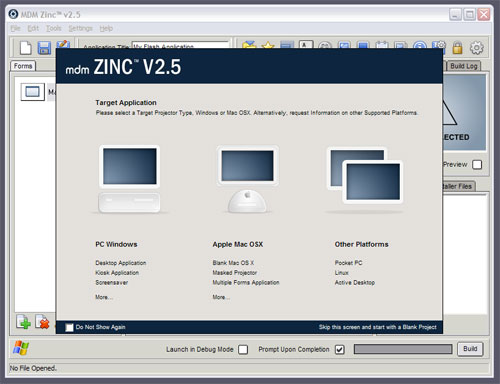
Figure 1
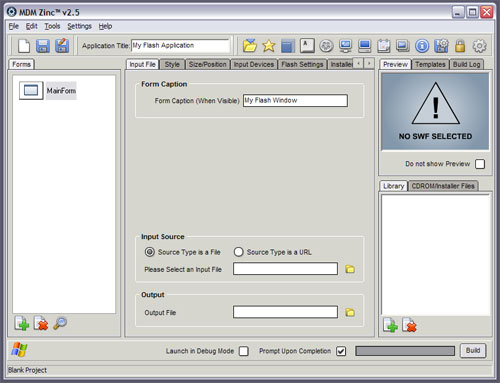
Figure 2
For packing in so many options, the interface is fairly nicely arranged. On the left is the Forms panel (fig. 3). You may recognize forms from their appearance in more recent versions of Flash, but for the uninitiated, forms-based development (at least as it relates to Zinc) allows you to effectively split up projects into various sections, each with its own Flash movie and associated settings. The main form controls a set of global options, while you can add additional sub-forms (up to 20 total, which is Zinc's current limitation) for really humongous projects.
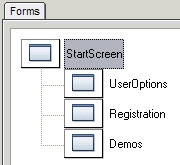
Figure 3
Regardless of whether you use forms or not, you'll likely be spending a lot of your time in the center portion of the Zinc interface, where oodles of tabs control all kinds of settings for your projectors. There are the mundane and necessary options, of course, such as defining the SWF files to use and setting the projector's size and location, so we won't dwell on those. I would, however, like to take a trip around the horn here and give a shout out to the few of the tabs in order to present you with a better idea of the level of control you get by wrapping your Flash movies inside a Zinc projector.
Related Sites: Creative Mac , Digital Producer , Digital Animators , Animation Artist , Audio Video Producer , Digital Game Developer , Digital Media Designer , Oceania , MacAnimationPro , MacDesignPro , Test Site , Flash
Related Newsletter: DMN Newsletter , CMN Newsletter , Pixels Newsletter , Levels Newsletter , Mac Alert Newsletter , Renders , Digital Media Net , DMNForums , Review Seeker
To Comment on This Article, Click HERE
Most Recent Reader Comments:
Click Here To Read All Posts
Must be Registered to Respond (Free Registration!!!, CLICK HERE)
Digital favorites
- Casino Online Non Aams
- Betting Sites UK
- Casino UK Sites
- Casino Online Non Aams
- Casino Non Aams
- Casinos Not On Gamstop
- UK Online Casinos Not On Gamstop
- Meilleur Casino En Ligne
- Crypto Casinos
- Casino Online Italia
- Migliori Giochi Casino Online
- Meilleur Casino En Ligne Français
- Casino En Ligne
- Meilleur Casino En Ligne Francais
- Siti Scommesse Non Aams
- Siti Poker Online Migliori
- Meilleur Site De Poker
- Site De Paris Sportif Nouveau
- Sweet Bonanza Fruits Avis
- Parier Sur Ufc
- Fm카지노 가입코드
- 비트코인 스포츠베팅
- Casino Jeux En Ligne
- Sites De Paris Sportifs
- Casino En Ligne Argent Réel
- Cresus Casino Avis
- Migliore Casino Non Aams
- Meilleur Casino En Ligne
- Meilleur Casino En Ligne 2026
- Casino En Ligne Fiable
- Casino En Ligne
- Migliori Casino Crypto
- Bonus Free Spin Senza Deposito
- Casino Online Non Aams Sicuri
- Migliori Siti Scommesse Non Aams
- Meilleur Casino En Ligne De France
- Casino En Ligne
- Casino En Ligne Fiable
- Trusted Online Casino Malaysia
- Nouveau Casino En Ligne 2026
- オンラインポーカー
- Casino En Ligne Cashlib


