 |
|
More Related Stories |
 |

From: $55  |
| Page (1) of 2 - 07/06/06 |
 email article email article |
 print
page print
page |
Yet, I occasionally need to resize an image, to create an icon suitable for posting on this site, or to clean up a digital photo. PhotoShop is clearly overkill for my casual business needs, and its price tag certainly is not justified for occasional use.
Perhaps, I thought, Xara Xtreme might fit the bill. The new version, at $79, promises to be a "cross-category graphics application that can handle photos, business graphics, drawing and illustration needs," implying that it'd be a good tool for those of us who have no desire (or, alas, no ability) to become professional, full-time graphic artists.
Currently, Xara Xtreme is a Windows application, but the company has announced plans to create Linux and Mac versions. It also says it plans to release the application as open source.
In some ways, Xara Xtreme succeeds well beyond my expectations. This is no dinky photo editor, appropriate only for removing red-eye and cropping snapshot images. Xara Xtreme has an impressive suite of features and most of the power of the big boys, such as Macromedia's Illustrator or Adobe PhotoShop. Unfortunately for us casual users, it also has some of their learning curve.
I want to be clear about this: Xara Xtreme is a powerful graphical application, and I'm blown away by what it can do. If you spend most of your day making things look pretty, and you don't have much money in your pocket, this would be a wise use of your limited funds. It would probably be a good purchase even if you have plenty of money, because some of its capabilities are impressive indeed. On the other hand, if you only need to whip out a Swiss Army Knife every few weeks to whittle off a rough edge, you'll spend more time trying to remember how to accomplish something than actually performing the task.
Do I sound overwhelmed? I am. Let me show you a bit of what the software is capable of.
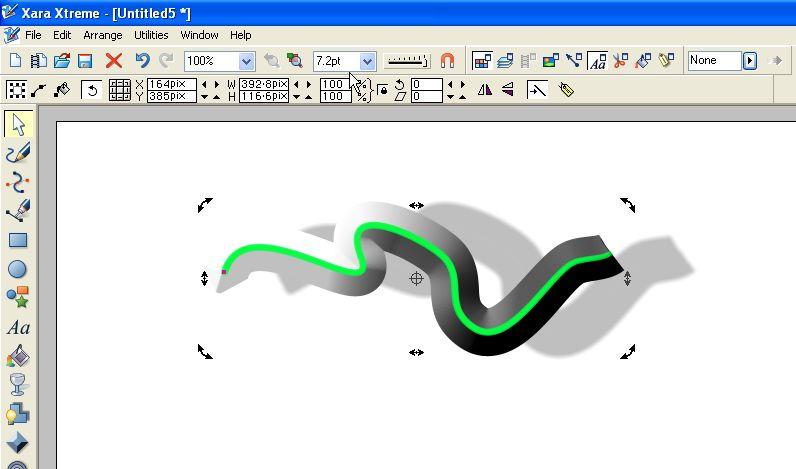 |
| When you change an object's attributes, the result appears instantaneously. |
Xara Xtreme treats everything as a live, editable object. Whether you're generating vector graphics or changing the drop-shadow on a product logo, the modifications are immediate. That means you aren't forever opening and closing dialog boxes; as you move a slider to change an item's hue, or to adjust the way a blend appears, the image changes in front of you. So do any effects that result from the image change, such as the movement of drop shadows or contours. There's no "Apply;" it just happens. A fast undo and redo makes it easy to experiment.
Related Newsletter: DMN Newsletter , Pixels Newsletter , Tutorial Finder , Review Seeker , IT Weekly Newsletter
To Comment on This Article, Click HERE
Most Recent Reader Comments:
Click Here To Read All Posts
Must be Registered to Respond (Free Registration!!!, CLICK HERE)
Digital favorites
- Casino Online Non Aams
- Betting Sites UK
- Casino UK Sites
- Casino Online Non Aams
- Casino Non Aams
- Casinos Not On Gamstop
- UK Online Casinos Not On Gamstop
- Meilleur Casino En Ligne
- Crypto Casinos
- Casino Online Italia
- Migliori Giochi Casino Online
- Meilleur Casino En Ligne Français
- Casino En Ligne
- Meilleur Casino En Ligne Francais
- Siti Scommesse Non Aams
- Siti Poker Online Migliori
- Meilleur Site De Poker
- Site De Paris Sportif Nouveau
- Sweet Bonanza Fruits Avis
- Parier Sur Ufc
- Fm카지노 가입코드
- 비트코인 스포츠베팅
- Casino Jeux En Ligne
- Sites De Paris Sportifs
- Casino En Ligne Argent Réel
- Cresus Casino Avis
- Migliore Casino Non Aams
- Meilleur Casino En Ligne
- Meilleur Casino En Ligne 2026
- Casino En Ligne Fiable
- Casino En Ligne
- Migliori Casino Crypto
- Bonus Free Spin Senza Deposito
- Casino Online Non Aams Sicuri
- Migliori Siti Scommesse Non Aams
- Meilleur Casino En Ligne De France
- Casino En Ligne
- Casino En Ligne Fiable
- Trusted Online Casino Malaysia
- Nouveau Casino En Ligne 2026
- オンラインポーカー
- Casino En Ligne Cashlib
Source:Digital Media Online.
All Rights Reserved


 (Rated by 34 users)


